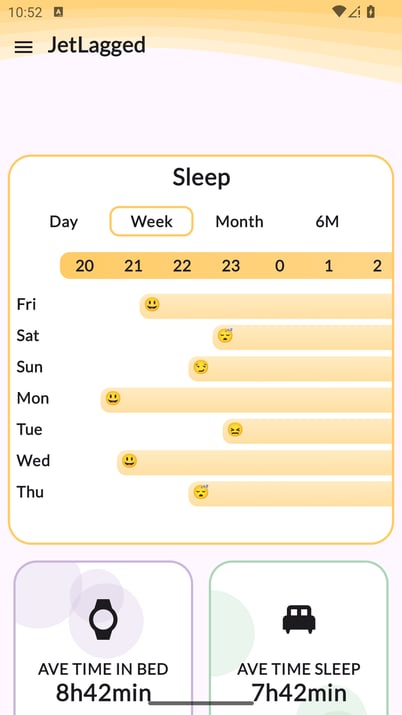
XenoCI Box builds, tests and screenshots Android apps on a Linux Android emulator with the same commands as iOS. Add --platform android, or let box find settings.gradle or gradlew in your project
1
Install and sign in
The same CLI and the same account as iOS. If box is already set up, skip to the next step
Every job command takes --platform ios or --platform android, and so does every MCP job tool (platform)
Without it, box looks at the project folder: an Xcode project, project.yml, Package.swift or an ios/ folder means iOS; settings.gradle, gradlew or an android/ folder means Android
When both are there (Flutter, React Native, Expo), box picks neither and exits 2 asking for --platform, so no job runs on the platform you did not mean
To fix the choice for a project, put platform = "android" (or "ios") in .box.toml. --platform still wins
Android has one size: 4 vCPU / 16 GB. It runs on a Linux Android emulator, and the emulator boot time is not billed
--xcode is for iOS only; with --platform android it exits 2
box debug and box build --device-build are iOS only and exit 2 on Android. box test runs every unit test (Gradle testDebugUnitTest), so --only-testing is not used
The debug APK is saved as .box/out/<job>/app-debug.apk. The Gradle cache stays between jobs of the same project, so the next build is incremental
Android costs $0.02 per minute on the one Android size (4 vCPU / 16 GB), from the same US dollar balance as the Mac. The emulator boot time is not billed. The current rate is at xenoci.com/api/v1/pricing, and every job prints its rate when it is submitted
{"docsConfig":{"theme":"mint","$schema":"https://mintlify.com/docs.json","name":"XenoCI Box","description":"XenoCI Box runs the iOS and Android builds, tests and screenshots of your coding agent on real machines","colors":{"primary":"#393C00","light":"#393C00","dark":"#393C00"},"logo":{"light":"https://mintcdn.com/xenoci/5K0lU7MNCvKvzp7d/logo/light.svg?fit=max\u0026auto=format\u0026n=5K0lU7MNCvKvzp7d\u0026q=85\u0026s=fa1d99df5d58dc3cb333cf076ccfd4ee","dark":"https://mintcdn.com/xenoci/5K0lU7MNCvKvzp7d/logo/light.svg?fit=max\u0026auto=format\u0026n=5K0lU7MNCvKvzp7d\u0026q=85\u0026s=fa1d99df5d58dc3cb333cf076ccfd4ee","href":"https://xenoci.com"},"favicon":"https://mintcdn.com/xenoci/5K0lU7MNCvKvzp7d/favicon.svg?fit=max\u0026auto=format\u0026n=5K0lU7MNCvKvzp7d\u0026q=85\u0026s=e0c4e3ae766cd443f16e29970126660e","appearance":{"default":"light","strict":true},"background":{"color":{"light":"#F5F5F5","dark":"#F5F5F5"}},"navbar":{"primary":{"type":"button","label":"Agent setup","href":"/setup"}},"footer":{"socials":{"github":"https://github.com/Xeno-CI"}},"search":{"prompt":"Search the XenoCI Box docs"},"seo":{"metatags":{"og:image":"/og.png","canonical":"https://docs.xenoci.com"},"indexing":"navigable"},"fonts":{"family":"IBM Plex Sans"},"styling":{"codeblocks":"system","latex":true},"contextual":{"options":["copy","cursor","claude"],"display":"header"},"navigation":{"global":{"anchors":[{"anchor":"Status","icon":"signal-bars","href":"https://xenoci.com/status"},{"anchor":"Pricing","icon":"dollar-sign","href":"/reference/pricing"},{"anchor":"Agent setup","icon":"square-terminal","href":"/setup"},{"anchor":"Support","icon":"bell-concierge","href":"/support"}]},"pages":[]}},"deployment":{"deploymentMetadataValue":{"subdomain":"xenoci","hasAudioNarration":false,"actualSubdomain":"xenoci","customDomains":[],"gitSource":{"type":"github","owner":"xeno-ci","repo":"docs","deployBranch":"main","contentDirectory":"","isPrivate":true,"mountPath":"","label":"","_id":"6b0bda385f25efb7cd1437a6"},"entitlements":{},"buildId":"6b0be179f26c07143e91810d","clientVersion":"0.0.4344","searchFilterCounts":[{"language":"default","tag":"Guides","count":18},{"language":"default","tag":"iOS","count":13},{"language":"default","tag":"Reference","count":12},{"language":"default","tag":"Agents","count":8},{"language":"default","tag":"Build and test","count":8},{"language":"default","tag":"Drive the app","count":7},{"language":"default","tag":"Android","count":6},{"language":"default","tag":"Connect your agent","count":5},{"language":"default","tag":"Get started","count":4},{"language":"default","tag":"What your agent uses","count":3}]},"assistantConfig":{"enableAskAiButton":false,"enableStarterQuestions":false,"enableContextualStarterQuestions":false,"enableAskAiSearchBar":true},"basePath":"","hasChatPermissions":false,"hasWebMcpPermissions":false,"toggles":[{"name":"kill-isr","enabled":true,"variant":{"name":"disabled","enabled":false,"feature_enabled":true},"impressionData":false},{"name":"custom-rbac-roles","enabled":true,"variant":{"name":"disabled","enabled":false,"feature_enabled":true},"impressionData":false},{"name":"agent-mintlify-slack","enabled":true,"variant":{"name":"disabled","enabled":false,"feature_enabled":true},"impressionData":false},{"name":"agent-integrations-settings","enabled":true,"variant":{"name":"disabled","enabled":false,"feature_enabled":true},"impressionData":false},{"name":"rbac-expansion","enabled":true,"variant":{"name":"disabled","enabled":false,"feature_enabled":true},"impressionData":false},{"name":"automations-pr-grouping","enabled":true,"variant":{"name":"disabled","enabled":false,"feature_enabled":true},"impressionData":false},{"name":"custom-prefix","enabled":true,"variant":{"name":"disabled","enabled":false,"feature_enabled":true},"impressionData":false},{"name":"analytics-v7","enabled":true,"variant":{"name":"disabled","enabled":false,"feature_enabled":true},"impressionData":false},{"name":"user-flows-analytics","enabled":true,"variant":{"name":"disabled","enabled":false,"feature_enabled":true},"impressionData":false},{"name":"no-publish-flow","enabled":true,"variant":{"name":"disabled","enabled":false,"feature_enabled":true},"impressionData":false},{"name":"snapshot-serving-live","enabled":true,"variant":{"name":"disabled","enabled":false,"feature_enabled":true},"impressionData":false},{"name":"stripTemperatureMiddleware","enabled":true,"variant":{"name":"disabled","enabled":false,"feature_enabled":true},"impressionData":false},{"name":"support-platform-pylon-zendesk","enabled":true,"variant":{"name":"disabled","enabled":false,"feature_enabled":true},"impressionData":false},{"name":"snapshot-serving","enabled":true,"variant":{"name":"disabled","enabled":false,"feature_enabled":true},"impressionData":false},{"name":"instant-rollback","enabled":true,"variant":{"name":"disabled","enabled":false,"feature_enabled":true},"impressionData":false},{"name":"granular-notifications-server","enabled":true,"variant":{"name":"disabled","enabled":false,"feature_enabled":true},"impressionData":false},{"name":"granular-notifications","enabled":true,"variant":{"name":"disabled","enabled":false,"feature_enabled":true},"impressionData":false},{"name":"automations-fable","enabled":true,"variant":{"name":"disabled","enabled":false,"feature_enabled":true},"impressionData":false},{"name":"fixed-ai-action-pricing","enabled":true,"variant":{"name":"disabled","enabled":false,"feature_enabled":true},"impressionData":false},{"name":"site-roles","enabled":true,"variant":{"name":"disabled","enabled":false,"feature_enabled":true},"impressionData":false},{"name":"automation-resolve-merge-conflict","enabled":true,"variant":{"name":"disabled","enabled":false,"feature_enabled":true},"impressionData":false},{"name":"scoped-publishing","enabled":true,"variant":{"name":"disabled","enabled":false,"feature_enabled":true},"impressionData":false},{"name":"mintql","enabled":true,"variant":{"name":"disabled","enabled":false,"feature_enabled":true},"impressionData":false},{"name":"page-level-analytics","enabled":true,"variant":{"name":"disabled","enabled":false,"feature_enabled":true},"impressionData":false},{"name":"editor-version-history-v2","enabled":true,"variant":{"name":"disabled","enabled":false,"feature_enabled":true},"impressionData":false},{"name":"billing-page-v2","enabled":true,"variant":{"name":"disabled","enabled":false,"feature_enabled":true},"impressionData":false},{"name":"full-page-search","enabled":true,"variant":{"name":"disabled","enabled":false,"feature_enabled":true},"impressionData":false},{"name":"workspace-projects","enabled":true,"variant":{"name":"disabled","enabled":false,"feature_enabled":true},"impressionData":false},{"name":"fork-pr-previews","enabled":true,"variant":{"name":"disabled","enabled":false,"feature_enabled":true},"impressionData":false},{"name":"revalidation-jwt","enabled":true,"variant":{"name":"disabled","enabled":false,"feature_enabled":true},"impressionData":false},{"name":"hobby-abuse-scan","enabled":true,"variant":{"name":"disabled","enabled":false,"feature_enabled":true},"impressionData":false},{"name":"dashboard-inbox","enabled":true,"variant":{"name":"disabled","enabled":false,"feature_enabled":true},"impressionData":false},{"name":"turbopuffer-dual-write","enabled":true,"variant":{"name":"disabled","enabled":false,"feature_enabled":true},"impressionData":false},{"name":"approve-review-flow","enabled":true,"variant":{"name":"disabled","enabled":false,"feature_enabled":true},"impressionData":false},{"name":"editor-metadata","enabled":true,"variant":{"name":"disabled","enabled":false,"feature_enabled":true},"impressionData":false},{"name":"turbopuffer-serve","enabled":true,"variant":{"name":"disabled","enabled":false,"feature_enabled":true},"impressionData":false},{"name":"live-agents","enabled":true,"variant":{"name":"disabled","enabled":false,"feature_enabled":true},"impressionData":false},{"name":"starter-pricing","enabled":true,"variant":{"name":"control","enabled":true,"payload":{"type":"string","value":"control"},"feature_enabled":true},"impressionData":false},{"name":"llms-txt-v2","enabled":true,"variant":{"name":"disabled","enabled":false,"feature_enabled":true},"impressionData":false},{"name":"wildcard-email-auth","enabled":true,"variant":{"name":"disabled","enabled":false,"feature_enabled":true},"impressionData":false}],"starterQuestions":[],"googleFontsInlined":false},"customCss":[]}
{"page":{"pagePath":"android/quickstart","slug":"/android/quickstart","pageMetadata":{"title":"Android emulator quickstart","description":"The same commands as iOS, with --platform android","icon":"rocket","sidebarTitle":"Android quickstart","href":"/android/quickstart"},"description":{"compiledSource":"\"use strict\";\nconst {jsx: _jsx} = arguments[0];\nconst {useMDXComponents: _provideComponents} = arguments[0];\nfunction _createMdxContent(props) {\n const _components = {\n p: \"p\",\n ..._provideComponents(),\n ...props.components\n };\n return _jsx(_components.p, {\n children: \"The same commands as iOS, with —platform android\"\n });\n}\nfunction MDXContent(props = {}) {\n const {wrapper: MDXLayout} = {\n ..._provideComponents(),\n ...props.components\n };\n return MDXLayout ? _jsx(MDXLayout, {\n ...props,\n children: _jsx(_createMdxContent, {\n ...props\n })\n }) : _createMdxContent(props);\n}\nreturn {\n default: MDXContent\n};\n","frontmatter":{},"scope":{}},"pageType":"default","mdx":{"mdxSource":{"compiledSource":"\"use strict\";const{Fragment:_Fragment,jsx:_jsx,jsxs:_jsxs}=arguments[0];const{useMDXComponents:_provideComponents}=arguments[0];function _createMdxContent(props){const _components={a:`a`,code:`code`,li:`li`,p:`p`,pre:`pre`,span:`span`,ul:`ul`,..._provideComponents(),...props.components},{Card,CardGroup,CodeBlock,Frame,Heading,Note,OptimizedImage,Step,Steps}=_components;if(!Card)_missingMdxReference(`Card`,true);if(!CardGroup)_missingMdxReference(`CardGroup`,true);if(!CodeBlock)_missingMdxReference(`CodeBlock`,true);if(!Frame)_missingMdxReference(`Frame`,true);if(!Heading)_missingMdxReference(`Heading`,true);if(!Note)_missingMdxReference(`Note`,true);if(!OptimizedImage)_missingMdxReference(`OptimizedImage`,true);if(!Step)_missingMdxReference(`Step`,true);if(!Steps)_missingMdxReference(`Steps`,true);return _jsxs(_Fragment,{children:[_jsx(Note,{children:_jsxs(_components.p,{children:[`XenoCI Box builds, tests and screenshots Android apps on a Linux Android emulator with the same commands as iOS. Add `,_jsx(_components.code,{children:`--platform android`}),`, or let box find `,_jsx(_components.code,{children:`settings.gradle`}),` or `,_jsx(_components.code,{children:`gradlew`}),` in your project`]})}),`\n`,_jsxs(Steps,{children:[_jsxs(Step,{title:`Install and sign in`,children:[_jsx(`span`,{id:`install`}),_jsx(_components.p,{children:`The same CLI and the same account as iOS. If box is already set up, skip to the next step`}),_jsx(CodeBlock,{filename:``,numberOfLines:`2`,language:`shellscript`,children:_jsx(_components.pre,{className:`shiki shiki-themes github-light-default dark-plus`,style:{backgroundColor:`#ffffff`,\"--shiki-dark-bg\":`#0B0C0E`,color:`#1f2328`,\"--shiki-dark\":`#D4D4D4`},language:`shellscript`,children:_jsxs(_components.code,{language:`shellscript`,numberOfLines:`2`,children:[_jsxs(_components.span,{className:`line`,children:[_jsx(_components.span,{style:{color:`#953800`,\"--shiki-dark\":`#DCDCAA`},children:`curl`}),_jsx(_components.span,{style:{color:`#0550AE`,\"--shiki-dark\":`#569CD6`},children:` -fsSL`}),_jsx(_components.span,{style:{color:`#0A3069`,\"--shiki-dark\":`#CE9178`},children:` https://xenoci.com/install.sh`}),_jsx(_components.span,{style:{color:`#CF222E`,\"--shiki-dark\":`#D4D4D4`},children:` |`}),_jsx(_components.span,{style:{color:`#953800`,\"--shiki-dark\":`#DCDCAA`},children:` sh`})]}),`\n`,_jsxs(_components.span,{className:`line`,children:[_jsx(_components.span,{style:{color:`#953800`,\"--shiki-dark\":`#DCDCAA`},children:`box`}),_jsx(_components.span,{style:{color:`#0A3069`,\"--shiki-dark\":`#CE9178`},children:` login`})]}),`\n`]})})}),_jsxs(_components.p,{children:[`Every way to install and sign in is on `,_jsx(_components.a,{href:`/ios/install`,children:`Install and sign in`})]})]}),_jsxs(Step,{title:`Build`,children:[_jsx(`span`,{id:`build`}),_jsxs(_components.p,{children:[`From the folder with `,_jsx(_components.code,{children:`settings.gradle`}),` or `,_jsx(_components.code,{children:`gradlew`}),`. Here it is the public sample `,_jsx(_components.a,{href:`https://github.com/android/compose-samples/tree/main/JetLagged`,children:`android/compose-samples JetLagged`}),` (Apache 2.0)`]}),_jsx(CodeBlock,{filename:``,numberOfLines:`2`,language:`shellscript`,children:_jsx(_components.pre,{className:`shiki shiki-themes github-light-default dark-plus`,style:{backgroundColor:`#ffffff`,\"--shiki-dark-bg\":`#0B0C0E`,color:`#1f2328`,\"--shiki-dark\":`#D4D4D4`},language:`shellscript`,children:_jsxs(_components.code,{language:`shellscript`,numberOfLines:`2`,children:[_jsxs(_components.span,{className:`line`,children:[_jsx(_components.span,{style:{color:`#953800`,\"--shiki-dark\":`#DCDCAA`},children:`git`}),_jsx(_components.span,{style:{color:`#0A3069`,\"--shiki-dark\":`#CE9178`},children:` clone`}),_jsx(_components.span,{style:{color:`#0A3069`,\"--shiki-dark\":`#CE9178`},children:` https://github.com/android/compose-samples`})]}),`\n`,_jsxs(_components.span,{className:`line`,children:[_jsx(_components.span,{style:{color:`#0550AE`,\"--shiki-dark\":`#DCDCAA`},children:`cd`}),_jsx(_components.span,{style:{color:`#0A3069`,\"--shiki-dark\":`#CE9178`},children:` compose-samples/JetLagged`})]}),`\n`]})})}),_jsx(Frame,{caption:`Android: box build, box test and box screenshot, ending on the screen the job saved`,children:_jsx(`video`,{controls:true,muted:true,loop:true,playsInline:true,autoPlay:true,preload:`metadata`,poster:`/media/docs/android-quickstart-poster.webp`,src:`https://mintcdn.com/xenoci/ZFKGlbE4Q2bw14Om/media/docs/android-quickstart.mp4?fit=max\u0026auto=format\u0026n=ZFKGlbE4Q2bw14Om\u0026q=85\u0026s=c0366e088792388ee13964fce9471ada`,width:`1280`,height:`778`,style:{width:`100%`,height:`auto`},\"data-path\":`media/docs/android-quickstart.mp4`})}),_jsx(CodeBlock,{filename:``,numberOfLines:`16`,language:`text`,children:_jsx(_components.pre,{className:`shiki shiki-themes github-light-default dark-plus`,style:{backgroundColor:`#ffffff`,\"--shiki-dark-bg\":`#0B0C0E`,color:`#1f2328`,\"--shiki-dark\":`#D4D4D4`},language:`text`,children:_jsxs(_components.code,{language:`text`,numberOfLines:`16`,children:[_jsx(_components.span,{className:`line`,children:_jsx(_components.span,{children:`$ box build --platform android`})}),`\n`,_jsx(_components.span,{className:`line`,children:_jsx(_components.span,{children:`box: upload: 74 files checked, 0 new (0 bytes), .gitignore respected, .env never sent (snapshot snap_fi48kxrK-WMRe3F3)`})}),`\n`,_jsx(_components.span,{className:`line`,children:_jsx(_components.span,{children:`box: queue: job bj__ad3mDX3BXh16XQO (build, android, $0.02/min) submitted`})}),`\n`,_jsx(_components.span,{className:`line`,children:_jsx(_components.span,{children:`box: status: queued`})}),`\n`,_jsx(_components.span,{className:`line`,children:_jsx(_components.span,{children:`box: machine: assigned, starting its VM (billed from when the VM is ready)`})}),`\n`,_jsx(_components.span,{className:`line`,children:_jsx(_components.span,{children:`box: status: running`})}),`\n`,_jsx(_components.span,{className:`line`,children:_jsx(_components.span,{children:`[box] kind=build platform=android project=jetlagged`})}),`\n`,_jsx(_components.span,{className:`line`,children:_jsx(_components.span,{children:`…`})}),`\n`,_jsx(_components.span,{className:`line`,children:_jsx(_components.span,{children:`BUILD SUCCESSFUL in 11s`})}),`\n`,_jsx(_components.span,{className:`line`,children:_jsx(_components.span,{children:`37 actionable tasks: 37 up-to-date`})}),`\n`,_jsx(_components.span,{className:`line`,children:_jsx(_components.span,{children:`[box] BOX_BUILD_SECONDS=12 rc=0`})}),`\n`,_jsx(_components.span,{className:`line`,children:_jsx(_components.span,{children:`box: build: done in 12s`})}),`\n`,_jsx(_components.span,{className:`line`,children:_jsx(_components.span,{children:`box: status: succeeded`})}),`\n`,_jsx(_components.span,{className:`line`,children:_jsx(_components.span,{children:`box: results: saved to ./.box/out/bj__ad3mDX3BXh16XQO/ (app-debug.apk, build.log)`})}),`\n`,_jsx(_components.span,{className:`line`,children:_jsx(_components.span,{children:`box: bj__ad3mDX3BXh16XQO succeeded, 60s billed, $0.02`})}),`\n`,_jsx(_components.span,{className:`line`,children:_jsx(_components.span,{})})]})})})]}),_jsxs(Step,{title:`See the app`,children:[_jsx(`span`,{id:`screenshot`}),_jsx(CodeBlock,{filename:``,numberOfLines:`14`,language:`text`,children:_jsx(_components.pre,{className:`shiki shiki-themes github-light-default dark-plus`,style:{backgroundColor:`#ffffff`,\"--shiki-dark-bg\":`#0B0C0E`,color:`#1f2328`,\"--shiki-dark\":`#D4D4D4`},language:`text`,children:_jsxs(_components.code,{language:`text`,numberOfLines:`14`,children:[_jsx(_components.span,{className:`line`,children:_jsx(_components.span,{children:`$ box screenshot --platform android`})}),`\n`,_jsx(_components.span,{className:`line`,children:_jsx(_components.span,{children:`box: queue: job bj_62GxzEFVpVFdUKgf (screenshot, android, $0.02/min) submitted`})}),`\n`,_jsx(_components.span,{className:`line`,children:_jsx(_components.span,{children:`…`})}),`\n`,_jsx(_components.span,{className:`line`,children:_jsx(_components.span,{children:`box: build: done in 11s`})}),`\n`,_jsx(_components.span,{className:`line`,children:_jsx(_components.span,{children:`[box] emulator ready (4.5s)`})}),`\n`,_jsx(_components.span,{className:`line`,children:_jsx(_components.span,{children:`Performing Streamed Install`})}),`\n`,_jsx(_components.span,{className:`line`,children:_jsx(_components.span,{children:`Success`})}),`\n`,_jsx(_components.span,{className:`line`,children:_jsx(_components.span,{children:`Starting: Intent { cmp=com.example.jetlagged/.MainActivity }`})}),`\n`,_jsx(_components.span,{className:`line`,children:_jsx(_components.span,{children:`…`})}),`\n`,_jsx(_components.span,{className:`line`,children:_jsx(_components.span,{children:`[box] screenshot box-out/screen.png`})}),`\n`,_jsx(_components.span,{className:`line`,children:_jsx(_components.span,{children:`box: status: succeeded`})}),`\n`,_jsx(_components.span,{className:`line`,children:_jsx(_components.span,{children:`box: results: saved to ./.box/out/bj_62GxzEFVpVFdUKgf/ (app-debug.apk, build.log, emulator.log, screen.png)`})}),`\n`,_jsx(_components.span,{className:`line`,children:_jsx(_components.span,{children:`box: bj_62GxzEFVpVFdUKgf succeeded, 60s billed, $0.02`})}),`\n`,_jsx(_components.span,{className:`line`,children:_jsx(_components.span,{})})]})})}),_jsx(Frame,{children:_jsx(OptimizedImage,{src:`https://mintcdn.com/xenoci/ZFKGlbE4Q2bw14Om/images/docs-feature-android.png?fit=max\u0026auto=format\u0026n=ZFKGlbE4Q2bw14Om\u0026q=85\u0026s=8bdaf164eac19c6eaafc4d27cde8449f`,alt:`The JetLagged sample on an Android emulator: the Sleep chart for the week, as box saved it`,style:{maxWidth:`320px`},\"data-og-width\":`402`,width:`402`,\"data-og-height\":`715`,height:`715`,\"data-path\":`images/docs-feature-android.png`,\"data-optimize\":`true`,\"data-opv\":`3`,srcset:`https://mintcdn.com/xenoci/ZFKGlbE4Q2bw14Om/images/docs-feature-android.png?w=280\u0026fit=max\u0026auto=format\u0026n=ZFKGlbE4Q2bw14Om\u0026q=85\u0026s=b99ab8552eda8bc6f55a090dba1346f8 280w, https://mintcdn.com/xenoci/ZFKGlbE4Q2bw14Om/images/docs-feature-android.png?w=560\u0026fit=max\u0026auto=format\u0026n=ZFKGlbE4Q2bw14Om\u0026q=85\u0026s=528665d87d85977e1dd8db17c4e8c837 560w, https://mintcdn.com/xenoci/ZFKGlbE4Q2bw14Om/images/docs-feature-android.png?w=840\u0026fit=max\u0026auto=format\u0026n=ZFKGlbE4Q2bw14Om\u0026q=85\u0026s=f2f948cd586cf09669249feaafed3763 840w, https://mintcdn.com/xenoci/ZFKGlbE4Q2bw14Om/images/docs-feature-android.png?w=1100\u0026fit=max\u0026auto=format\u0026n=ZFKGlbE4Q2bw14Om\u0026q=85\u0026s=086dd55c6676092b0232716eb26da0ae 1100w, https://mintcdn.com/xenoci/ZFKGlbE4Q2bw14Om/images/docs-feature-android.png?w=1650\u0026fit=max\u0026auto=format\u0026n=ZFKGlbE4Q2bw14Om\u0026q=85\u0026s=cae49226e95f6ee3dd2d7106e605fc66 1650w, https://mintcdn.com/xenoci/ZFKGlbE4Q2bw14Om/images/docs-feature-android.png?w=2500\u0026fit=max\u0026auto=format\u0026n=ZFKGlbE4Q2bw14Om\u0026q=85\u0026s=5721774bcdafd4329b3e3726df1098d1 2500w`})}),_jsx(_components.p,{children:`The picture box saved, made smaller for this page`})]})]}),`\n`,_jsx(`span`,{id:`next`}),`\n`,_jsx(Heading,{level:`2`,id:`what-to-look-at-next`,children:`What to look at next`}),`\n`,_jsxs(CardGroup,{cols:2,children:[_jsx(Card,{title:`Test`,icon:`flask-vial`,href:`/android/test`,children:_jsx(_components.p,{children:`Run your JVM unit tests and read what failed`})}),_jsx(Card,{title:`Run and tap`,icon:`hand-pointer`,href:`/android/run`,children:_jsx(_components.p,{children:`Keep the app open and drive it with box ui`})}),_jsx(Card,{title:`Exec`,icon:`terminal`,href:`/android/exec`,children:_jsx(_components.p,{children:`Any Gradle task or shell command on the machine`})}),_jsx(Card,{title:`Pricing`,icon:`circle-dollar`,href:`/reference/pricing`,children:_jsx(_components.p,{children:`What an Android minute costs`})})]}),`\n`,_jsx(`span`,{id:`differs`}),`\n`,_jsx(Heading,{level:`2`,id:`how-it-differs-from-ios`,children:`How it differs from iOS`}),`\n`,_jsxs(_components.ul,{children:[`\n`,_jsxs(_components.li,{children:[`Every job command takes `,_jsx(_components.code,{children:`--platform ios`}),` or `,_jsx(_components.code,{children:`--platform android`}),`, and so does every MCP job tool (`,_jsx(_components.code,{children:`platform`}),`)`]}),`\n`,_jsxs(_components.li,{children:[`Without it, box looks at the project folder: an Xcode project, `,_jsx(_components.code,{children:`project.yml`}),`, `,_jsx(_components.code,{children:`Package.swift`}),` or an `,_jsx(_components.code,{children:`ios/`}),` folder means iOS; `,_jsx(_components.code,{children:`settings.gradle`}),`, `,_jsx(_components.code,{children:`gradlew`}),` or an `,_jsx(_components.code,{children:`android/`}),` folder means Android`]}),`\n`,_jsxs(_components.li,{children:[`When both are there (Flutter, React Native, Expo), box picks neither and exits 2 asking for `,_jsx(_components.code,{children:`--platform`}),`, so no job runs on the platform you did not mean`]}),`\n`,_jsxs(_components.li,{children:[`To fix the choice for a project, put `,_jsx(_components.code,{children:`platform = \"android\"`}),` (or `,_jsx(_components.code,{children:`\"ios\"`}),`) in `,_jsx(_components.code,{children:`.box.toml`}),`. `,_jsx(_components.code,{children:`--platform`}),` still wins`]}),`\n`,_jsx(_components.li,{children:`Android has one size: 4 vCPU / 16 GB. It runs on a Linux Android emulator, and the emulator boot time is not billed`}),`\n`,_jsxs(_components.li,{children:[_jsx(_components.code,{children:`--xcode`}),` is for iOS only; with `,_jsx(_components.code,{children:`--platform android`}),` it exits 2`]}),`\n`,_jsxs(_components.li,{children:[_jsx(_components.code,{children:`box debug`}),` and `,_jsx(_components.code,{children:`box build --device-build`}),` are iOS only and exit 2 on Android. `,_jsx(_components.code,{children:`box test`}),` runs every unit test (Gradle `,_jsx(_components.code,{children:`testDebugUnitTest`}),`), so `,_jsx(_components.code,{children:`--only-testing`}),` is not used`]}),`\n`,_jsxs(_components.li,{children:[`The debug APK is saved as `,_jsx(_components.code,{children:`.box/out/\u003cjob>/app-debug.apk`}),`. The Gradle cache stays between jobs of the same project, so the next build is incremental`]}),`\n`]}),`\n`,_jsxs(_components.p,{children:[`Android costs $0.02 per minute on the one Android size (4 vCPU / 16 GB), from the same US dollar balance as the Mac. The emulator boot time is not billed. The current rate is at `,_jsx(_components.a,{href:`https://xenoci.com/api/v1/pricing`,children:`xenoci.com/api/v1/pricing`}),`, and every job prints its rate when it is submitted`]})]})}function MDXContent(props={}){const{wrapper:MDXLayout}={..._provideComponents(),...props.components};return MDXLayout?_jsx(MDXLayout,{...props,children:_jsx(_createMdxContent,{...props})}):_createMdxContent(props)}return{default:MDXContent};function _missingMdxReference(id,component){throw new Error(`Expected `+(component?`component`:`object`)+\" `\"+id+\"` to be defined: you likely forgot to import, pass, or provide it.\")}","frontmatter":{},"scope":{"codeStyling":"system","config":{},"pageMetadata":{"title":"Android emulator quickstart","description":"The same commands as iOS, with --platform android","icon":"rocket","sidebarTitle":"Android quickstart","href":"/android/quickstart"}}},"mdxSourceWithNoJs":null},"mdxExtracts":{"tableOfContents":[{"title":"What to look at next","slug":"what-to-look-at-next","depth":2,"children":[]},{"title":"How it differs from iOS","slug":"how-it-differs-from-ios","depth":2,"children":[]}],"codeExamples":{}},"jsLinks":[],"subdomain":"xenoci","siteName":"XenoCI Box","title":"Android emulator quickstart - XenoCI Box","contextualStarterQuestions":[],"navMaps":{"firstHrefInVersion":{},"firstHrefInLanguage":{}},"lastModified":"2026-11-29T08:16:14.677Z","originalFileLocation":"android/quickstart.mdx"},"headHtml":"\u003cscript data-mint-head>(function(){var d=document.documentElement,p=\"light\";if(!p){try{p=localStorage.getItem(\"isDarkMode\")}catch(e){}if(p==='true')p='dark';else if(p==='false')p='light';if(p!=='light'\u0026\u0026p!=='dark'\u0026\u0026p!=='system')p=\"light\"}var r=p==='system'?(matchMedia(\"(prefers-color-scheme: dark)\").matches?'dark':'light'):p;d.classList.remove(r==='dark'?'light':'dark');d.classList.add(r);d.setAttribute(\"data-theme-preference\",p)})();\u003c/script>\u003cmeta data-mint-head name=\"description\" content=\"The same commands as iOS, with --platform android\">\u003cmeta data-mint-head name=\"application-name\" content=\"XenoCI Box\">\u003cmeta data-mint-head name=\"generator\" content=\"Mintlify\">\u003clink data-mint-head rel=\"icon\" type=\"image/png\" sizes=\"192x192\" href=\"/mintlify-assets/_mintlify/favicons/xenoci/zCsFhQ1SwmjPyl_B/_generated/favicon/android-chrome-192x192.png\" media=\"(prefers-color-scheme: light)\">\u003clink data-mint-head rel=\"apple-touch-icon\" type=\"image/png\" sizes=\"180x180\" href=\"/mintlify-assets/_mintlify/favicons/xenoci/zCsFhQ1SwmjPyl_B/_generated/favicon/apple-touch-icon.png\">\u003clink data-mint-head rel=\"icon\" type=\"image/png\" sizes=\"16x16\" href=\"/mintlify-assets/_mintlify/favicons/xenoci/zCsFhQ1SwmjPyl_B/_generated/favicon/favicon-16x16.png\" media=\"(prefers-color-scheme: light)\">\u003clink data-mint-head rel=\"icon\" type=\"image/png\" sizes=\"32x32\" href=\"/mintlify-assets/_mintlify/favicons/xenoci/zCsFhQ1SwmjPyl_B/_generated/favicon/favicon-32x32.png\" media=\"(prefers-color-scheme: light)\">\u003clink data-mint-head rel=\"shortcut icon\" type=\"image/x-icon\" href=\"/mintlify-assets/_mintlify/favicons/xenoci/zCsFhQ1SwmjPyl_B/_generated/favicon/favicon.ico\" media=\"(prefers-color-scheme: light)\">\u003clink data-mint-head rel=\"icon\" type=\"image/png\" sizes=\"192x192\" href=\"/mintlify-assets/_mintlify/favicons/xenoci/zCsFhQ1SwmjPyl_B/_generated/favicon-dark/android-chrome-192x192.png\" media=\"(prefers-color-scheme: dark)\">\u003clink data-mint-head rel=\"icon\" type=\"image/png\" sizes=\"16x16\" href=\"/mintlify-assets/_mintlify/favicons/xenoci/zCsFhQ1SwmjPyl_B/_generated/favicon-dark/favicon-16x16.png\" media=\"(prefers-color-scheme: dark)\">\u003clink data-mint-head rel=\"icon\" type=\"image/png\" sizes=\"32x32\" href=\"/mintlify-assets/_mintlify/favicons/xenoci/zCsFhQ1SwmjPyl_B/_generated/favicon-dark/favicon-32x32.png\" media=\"(prefers-color-scheme: dark)\">\u003clink data-mint-head rel=\"shortcut icon\" type=\"image/x-icon\" href=\"/mintlify-assets/_mintlify/favicons/xenoci/zCsFhQ1SwmjPyl_B/_generated/favicon-dark/favicon.ico\" media=\"(prefers-color-scheme: dark)\">\u003cmeta data-mint-head property=\"og:title\" content=\"Android emulator quickstart - XenoCI Box\">\u003cmeta data-mint-head property=\"og:description\" content=\"The same commands as iOS, with --platform android\">\u003cmeta data-mint-head property=\"og:site_name\" content=\"XenoCI Box\">\u003cmeta data-mint-head property=\"og:url\" content=\"https://docs.xenoci.com/android/quickstart\">\u003cmeta data-mint-head property=\"og:type\" content=\"website\">\u003cmeta data-mint-head property=\"og:image\" content=\"https://xenoci.mintlify.site/og.png\">\u003cmeta data-mint-head property=\"og:image:width\" content=\"1200\">\u003cmeta data-mint-head property=\"og:image:height\" content=\"630\">\u003cmeta data-mint-head name=\"twitter:card\" content=\"summary_large_image\">\u003cmeta data-mint-head name=\"twitter:title\" content=\"Android emulator quickstart - XenoCI Box\">\u003cmeta data-mint-head name=\"twitter:description\" content=\"The same commands as iOS, with --platform android\">\u003cmeta data-mint-head name=\"twitter:image\" content=\"https://xenoci.mintlify.site/og.png\">\u003cmeta data-mint-head name=\"twitter:image:width\" content=\"1200\">\u003cmeta data-mint-head name=\"twitter:image:height\" content=\"630\">\u003cmeta data-mint-head name=\"msapplication-config\" content=\"/mintlify-assets/_mintlify/favicons/xenoci/zCsFhQ1SwmjPyl_B/_generated/favicon/browserconfig.xml\">\u003cmeta data-mint-head name=\"apple-mobile-web-app-title\" content=\"XenoCI Box\">\u003cmeta data-mint-head name=\"msapplication-TileColor\" content=\"#393C00\">\u003clink data-mint-head rel=\"canonical\" href=\"https://docs.xenoci.com/android/quickstart\">\u003clink data-mint-head rel=\"alternate\" type=\"application/xml\" href=\"/sitemap.xml\">\u003clink data-mint-head rel=\"alternate\" type=\"text/markdown\" href=\"/android/quickstart.md\">\u003cscript data-mint-head type=\"application/ld+json\">{\"@context\":\"https://schema.org\",\"@graph\":[{\"@type\":\"Organization\",\"@id\":\"https://docs.xenoci.com/#organization\",\"name\":\"XenoCI Box\",\"url\":\"https://docs.xenoci.com\",\"logo\":{\"@type\":\"ImageObject\",\"url\":\"https://mintcdn.com/xenoci/5K0lU7MNCvKvzp7d/logo/light.svg?fit=max\u0026auto=format\u0026n=5K0lU7MNCvKvzp7d\u0026q=85\u0026s=fa1d99df5d58dc3cb333cf076ccfd4ee\"}},{\"@type\":\"WebSite\",\"@id\":\"https://docs.xenoci.com#website\",\"name\":\"XenoCI Box\",\"url\":\"https://docs.xenoci.com\",\"publisher\":{\"@id\":\"https://docs.xenoci.com/#organization\"}},{\"@type\":\"WebPage\",\"@id\":\"https://docs.xenoci.com/android/quickstart#webpage\",\"url\":\"https://docs.xenoci.com/android/quickstart\",\"name\":\"Android emulator quickstart\",\"description\":\"The same commands as iOS, with --platform android\",\"dateModified\":\"2026-11-29T08:16:14.677Z\",\"isPartOf\":{\"@id\":\"https://docs.xenoci.com#website\"},\"breadcrumb\":{\"@id\":\"https://docs.xenoci.com/android/quickstart#breadcrumb\"}},{\"@type\":\"BreadcrumbList\",\"@id\":\"https://docs.xenoci.com/android/quickstart#breadcrumb\",\"itemListElement\":[{\"@type\":\"ListItem\",\"position\":1,\"name\":\"XenoCI Box\",\"item\":\"https://docs.xenoci.com\"},{\"@type\":\"ListItem\",\"position\":2,\"name\":\"Android emulator quickstart\",\"item\":\"https://docs.xenoci.com/android/quickstart\"}]},{\"@type\":[\"Article\",\"TechArticle\"],\"@id\":\"https://docs.xenoci.com/android/quickstart#article\",\"headline\":\"Android emulator quickstart\",\"name\":\"Android emulator quickstart\",\"description\":\"The same commands as iOS, with --platform android\",\"url\":\"https://docs.xenoci.com/android/quickstart\",\"mainEntityOfPage\":{\"@id\":\"https://docs.xenoci.com/android/quickstart#webpage\"},\"image\":\"https://docs.xenoci.com/og.png\",\"dateModified\":\"2026-11-29T08:16:14.677Z\",\"publisher\":{\"@id\":\"https://docs.xenoci.com/#organization\"},\"isPartOf\":{\"@id\":\"https://docs.xenoci.com#website\"}}]}\u003c/script>\u003cscript data-mint-head type=\"application/ld+json\">{\"@context\":\"https://schema.org\",\"@type\":\"WebSite\",\"name\":\"XenoCI Box\",\"publisher\":{\"@type\":\"Organization\",\"name\":\"XenoCI Box\"},\"provider\":{\"@type\":\"Organization\",\"name\":\"Mintlify\",\"url\":\"https://mintlify.com\"}}\u003c/script>","agentPointerHref":"/android/quickstart.md","siteName":"XenoCI Box","nav":{"global":{"anchors":[{"anchor":"Status","icon":"signal-bars","href":"https://xenoci.com/status"},{"anchor":"Pricing","icon":"dollar-sign","href":"/reference/pricing"},{"anchor":"Agent setup","icon":"square-terminal","href":"/setup"},{"anchor":"Support","icon":"bell-concierge","href":"/support"}]},"tabs":[{"tab":"iOS","icon":"apple","pages":[{"title":"iOS","href":""}]},{"tab":"Android","icon":"android","groups":[{"group":"Get started","pages":[{"title":"Android emulator quickstart","icon":"rocket","sidebarTitle":"Android quickstart","href":"/android/quickstart"}]},{"group":"Build and test","pages":[{"title":"Build","description":"Gradle assembleDebug on a Linux machine; the debug APK comes back","icon":"hammer","sidebarTitle":"Build without an SDK","href":"/android/build"},{"title":"Test","icon":"flask-vial","sidebarTitle":"Unit tests on a clean machine","href":"/android/test"},{"title":"Exec","icon":"terminal","sidebarTitle":"Any Gradle task","href":"/android/exec"}]},{"group":"Drive the app","pages":[{"title":"Screenshot","icon":"camera","sidebarTitle":"See the screen","href":"/android/screenshot"},{"title":"Run and tap","icon":"hand-pointer","sidebarTitle":"Keep the app open and tap","href":"/android/run"}]}]},{"tab":"Agents","icon":"robot","pages":[{"title":"Agents","href":"/agents"}]},{"tab":"Reference","icon":"book","pages":[{"title":"Reference","href":"/reference/commands"}]},{"tab":"Guides","icon":"book-open","pages":[{"title":"Guides","href":"/guides"}]}]},"basePath":"","title":"Android emulator quickstart - XenoCI Box","deploymentId":"dpl_EwfxjeKENdVkfzdag8rM6mKzcTUJ","buildId":"dpl_EwfxjeKENdVkfzdag8rM6mKzcTUJ","dynamics":["07c022d89b","a74be98ba7"],"chunks":["Frame-CG7QalVD.js","DynamicMarkdown-B_9ywLDq.js","zoom-image-lightbox-uS0aI388.js","lightbox-handle-r17bVUz3.js"]}