From nothing to a screenshot of your app in four steps. Every output below is what box printed for a real run
1
Paste one line into your agent
Open Claude Code, Codex or Cursor in your project and paste this. The agent installs XenoCI Box, signs you in and runs your first build; the steps below are what it does, so you can also run them yourself
Set up box with https://xenoci.com/setup
XenoCI Box runs on Linux (x86_64, arm64), WSL or a Mac with Apple silicon. To install it by hand, pick one
curl -fsSL https://xenoci.com/install.sh | sh
npm i -g --prefix ~/.local @xenoci/box
npx -y @xenoci/box@latest <command>
box 0.1.46 installed at ~/.local/bin/box (API https://xenoci.com/api)
2
Sign in with GitHub
box login
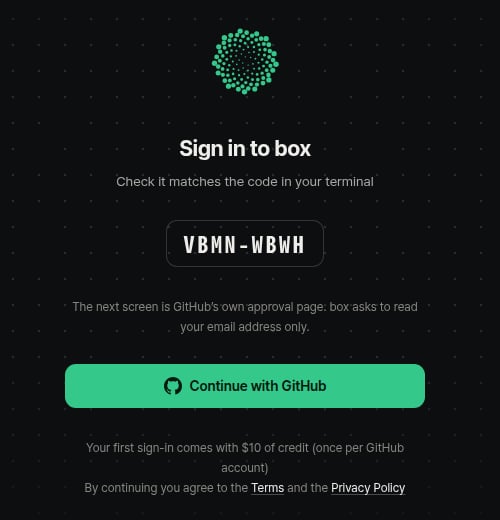
A sign-in page opens with the code your terminal shows. Press Continue with GitHub, approve on GitHub’s own page (box reads your email address only), and the terminal carries on by itself
box: signed in as hyeonsuju33-opsbox: balance $2.21 (about 44 iOS or 110 Android build minutes)
That account had used part of its credit. Your first sign-in with a GitHub account adds $10
box build, then box screenshot of the Tally example app, ending on the screen the job saved
box: uploading 1/37 TODOListMVVM/Views/Buttons/ContextMenu/DeleteButton.swift…box: upload: 40 files checked, 37 new (48 KB), .gitignore respected, .env never sent (snapshot snap_U6yR_XryxDkXiZRz)box: queue: job bj_7-3bV-glUcpaJYOu (build, ios, $0.05/min) submittedbox: status: runningbox: machine: source unpackedbox: cache: first build of this project on its disk, so everything is built oncebox: build: xcodebuild buildbox: build: done in 9sbox: status: succeededbox: results: saved to ./.box/out/bj_7-3bV-glUcpaJYOu/ (build.log, list.json)box: bj_7-3bV-glUcpaJYOu succeeded, 60s billed, $0.05
What if the build fails?
A failed build prints each compile error as file:line:col with your local path and the lines around it, and exits 1. Why it failed shows where to read a failure first
4
See the app
box screenshot app.png
box: upload: 40 files checked, 0 new (0 bytes), .gitignore respected, .env never sent (snapshot snap_fI2_p31QeIHfWFb0)box: queue: job bj_qMjtE9vhlbXZOd20 (screenshot, ios, $0.05/min) submittedbox: build: done in 16sbox: status: succeededbox: results: saved to ./.box/out/bj_qMjtE9vhlbXZOd20/ (build.log, list.json, screen.png)box: bj_qMjtE9vhlbXZOd20 succeeded, 120s billed, $0.10
The file box saved, made smaller for this page
Add --dark or --locale ja for dark mode or another language
Test
Run your tests on a simulator and read what failed
Run the app
Keep it open and drive it with box ui
Test before every push
A git hook that runs box test first
Commands
Debug, web pages, shell, jobs and usage
{"docsConfig":{"theme":"mint","$schema":"https://mintlify.com/docs.json","name":"XenoCI Box","description":"XenoCI Box runs the iOS and Android builds, tests and screenshots of your coding agent on real machines","colors":{"primary":"#393C00","light":"#393C00","dark":"#393C00"},"logo":{"light":"https://mintcdn.com/xenoci/5K0lU7MNCvKvzp7d/logo/light.svg?fit=max\u0026auto=format\u0026n=5K0lU7MNCvKvzp7d\u0026q=85\u0026s=fa1d99df5d58dc3cb333cf076ccfd4ee","dark":"https://mintcdn.com/xenoci/5K0lU7MNCvKvzp7d/logo/light.svg?fit=max\u0026auto=format\u0026n=5K0lU7MNCvKvzp7d\u0026q=85\u0026s=fa1d99df5d58dc3cb333cf076ccfd4ee","href":"https://xenoci.com"},"favicon":"https://mintcdn.com/xenoci/5K0lU7MNCvKvzp7d/favicon.svg?fit=max\u0026auto=format\u0026n=5K0lU7MNCvKvzp7d\u0026q=85\u0026s=e0c4e3ae766cd443f16e29970126660e","appearance":{"default":"light","strict":true},"background":{"color":{"light":"#F5F5F5","dark":"#F5F5F5"}},"navbar":{"primary":{"type":"button","label":"Agent setup","href":"/setup"}},"footer":{"socials":{"github":"https://github.com/Xeno-CI"}},"search":{"prompt":"Search the XenoCI Box docs"},"seo":{"metatags":{"og:image":"/og.png","canonical":"https://docs.xenoci.com"},"indexing":"navigable"},"fonts":{"family":"IBM Plex Sans"},"styling":{"codeblocks":"system","latex":true},"contextual":{"options":["copy","cursor","claude"],"display":"header"},"navigation":{"global":{"anchors":[{"anchor":"Status","icon":"signal-bars","href":"https://xenoci.com/status"},{"anchor":"Pricing","icon":"dollar-sign","href":"/reference/pricing"},{"anchor":"Agent setup","icon":"square-terminal","href":"/setup"},{"anchor":"Support","icon":"bell-concierge","href":"/support"}]},"pages":[]}},"deployment":{"deploymentMetadataValue":{"subdomain":"xenoci","hasAudioNarration":false,"actualSubdomain":"xenoci","customDomains":[],"gitSource":{"type":"github","owner":"xeno-ci","repo":"docs","deployBranch":"main","contentDirectory":"","isPrivate":true,"mountPath":"","label":"","_id":"6b0bda385f25efb7cd1437a6"},"entitlements":{},"buildId":"6b0be179f26c07143e91810d","clientVersion":"0.0.4344","searchFilterCounts":[{"language":"default","tag":"Guides","count":18},{"language":"default","tag":"iOS","count":13},{"language":"default","tag":"Reference","count":12},{"language":"default","tag":"Agents","count":8},{"language":"default","tag":"Build and test","count":8},{"language":"default","tag":"Drive the app","count":7},{"language":"default","tag":"Android","count":6},{"language":"default","tag":"Connect your agent","count":5},{"language":"default","tag":"Get started","count":4},{"language":"default","tag":"What your agent uses","count":3}]},"assistantConfig":{"enableAskAiButton":false,"enableStarterQuestions":false,"enableContextualStarterQuestions":false,"enableAskAiSearchBar":true},"basePath":"","hasChatPermissions":false,"hasWebMcpPermissions":false,"toggles":[{"name":"kill-isr","enabled":true,"variant":{"name":"disabled","enabled":false,"feature_enabled":true},"impressionData":false},{"name":"custom-rbac-roles","enabled":true,"variant":{"name":"disabled","enabled":false,"feature_enabled":true},"impressionData":false},{"name":"agent-mintlify-slack","enabled":true,"variant":{"name":"disabled","enabled":false,"feature_enabled":true},"impressionData":false},{"name":"agent-integrations-settings","enabled":true,"variant":{"name":"disabled","enabled":false,"feature_enabled":true},"impressionData":false},{"name":"rbac-expansion","enabled":true,"variant":{"name":"disabled","enabled":false,"feature_enabled":true},"impressionData":false},{"name":"automations-pr-grouping","enabled":true,"variant":{"name":"disabled","enabled":false,"feature_enabled":true},"impressionData":false},{"name":"custom-prefix","enabled":true,"variant":{"name":"disabled","enabled":false,"feature_enabled":true},"impressionData":false},{"name":"analytics-v7","enabled":true,"variant":{"name":"disabled","enabled":false,"feature_enabled":true},"impressionData":false},{"name":"user-flows-analytics","enabled":true,"variant":{"name":"disabled","enabled":false,"feature_enabled":true},"impressionData":false},{"name":"no-publish-flow","enabled":true,"variant":{"name":"disabled","enabled":false,"feature_enabled":true},"impressionData":false},{"name":"snapshot-serving-live","enabled":true,"variant":{"name":"disabled","enabled":false,"feature_enabled":true},"impressionData":false},{"name":"stripTemperatureMiddleware","enabled":true,"variant":{"name":"disabled","enabled":false,"feature_enabled":true},"impressionData":false},{"name":"support-platform-pylon-zendesk","enabled":true,"variant":{"name":"disabled","enabled":false,"feature_enabled":true},"impressionData":false},{"name":"snapshot-serving","enabled":true,"variant":{"name":"disabled","enabled":false,"feature_enabled":true},"impressionData":false},{"name":"instant-rollback","enabled":true,"variant":{"name":"disabled","enabled":false,"feature_enabled":true},"impressionData":false},{"name":"granular-notifications-server","enabled":true,"variant":{"name":"disabled","enabled":false,"feature_enabled":true},"impressionData":false},{"name":"granular-notifications","enabled":true,"variant":{"name":"disabled","enabled":false,"feature_enabled":true},"impressionData":false},{"name":"automations-fable","enabled":true,"variant":{"name":"disabled","enabled":false,"feature_enabled":true},"impressionData":false},{"name":"fixed-ai-action-pricing","enabled":true,"variant":{"name":"disabled","enabled":false,"feature_enabled":true},"impressionData":false},{"name":"site-roles","enabled":true,"variant":{"name":"disabled","enabled":false,"feature_enabled":true},"impressionData":false},{"name":"automation-resolve-merge-conflict","enabled":true,"variant":{"name":"disabled","enabled":false,"feature_enabled":true},"impressionData":false},{"name":"scoped-publishing","enabled":true,"variant":{"name":"disabled","enabled":false,"feature_enabled":true},"impressionData":false},{"name":"mintql","enabled":true,"variant":{"name":"disabled","enabled":false,"feature_enabled":true},"impressionData":false},{"name":"page-level-analytics","enabled":true,"variant":{"name":"disabled","enabled":false,"feature_enabled":true},"impressionData":false},{"name":"editor-version-history-v2","enabled":true,"variant":{"name":"disabled","enabled":false,"feature_enabled":true},"impressionData":false},{"name":"billing-page-v2","enabled":true,"variant":{"name":"disabled","enabled":false,"feature_enabled":true},"impressionData":false},{"name":"full-page-search","enabled":true,"variant":{"name":"disabled","enabled":false,"feature_enabled":true},"impressionData":false},{"name":"workspace-projects","enabled":true,"variant":{"name":"disabled","enabled":false,"feature_enabled":true},"impressionData":false},{"name":"fork-pr-previews","enabled":true,"variant":{"name":"disabled","enabled":false,"feature_enabled":true},"impressionData":false},{"name":"revalidation-jwt","enabled":true,"variant":{"name":"disabled","enabled":false,"feature_enabled":true},"impressionData":false},{"name":"hobby-abuse-scan","enabled":true,"variant":{"name":"disabled","enabled":false,"feature_enabled":true},"impressionData":false},{"name":"dashboard-inbox","enabled":true,"variant":{"name":"disabled","enabled":false,"feature_enabled":true},"impressionData":false},{"name":"turbopuffer-dual-write","enabled":true,"variant":{"name":"disabled","enabled":false,"feature_enabled":true},"impressionData":false},{"name":"approve-review-flow","enabled":true,"variant":{"name":"disabled","enabled":false,"feature_enabled":true},"impressionData":false},{"name":"editor-metadata","enabled":true,"variant":{"name":"disabled","enabled":false,"feature_enabled":true},"impressionData":false},{"name":"turbopuffer-serve","enabled":true,"variant":{"name":"disabled","enabled":false,"feature_enabled":true},"impressionData":false},{"name":"live-agents","enabled":true,"variant":{"name":"disabled","enabled":false,"feature_enabled":true},"impressionData":false},{"name":"starter-pricing","enabled":true,"variant":{"name":"control","enabled":true,"payload":{"type":"string","value":"control"},"feature_enabled":true},"impressionData":false},{"name":"llms-txt-v2","enabled":true,"variant":{"name":"disabled","enabled":false,"feature_enabled":true},"impressionData":false},{"name":"wildcard-email-auth","enabled":true,"variant":{"name":"disabled","enabled":false,"feature_enabled":true},"impressionData":false}],"starterQuestions":[],"googleFontsInlined":false},"customCss":[]}
{"page":{"pagePath":"quickstart","slug":"/quickstart","pageMetadata":{"title":"Quickstart","description":"From nothing to a screenshot of your app in four steps. Every output below is what box printed for a real run","icon":"play","sidebarTitle":"Quickstart","href":"/quickstart"},"description":{"compiledSource":"\"use strict\";\nconst {jsx: _jsx} = arguments[0];\nconst {useMDXComponents: _provideComponents} = arguments[0];\nfunction _createMdxContent(props) {\n const _components = {\n p: \"p\",\n ..._provideComponents(),\n ...props.components\n };\n return _jsx(_components.p, {\n children: \"From nothing to a screenshot of your app in four steps. Every output below is what box printed for a real run\"\n });\n}\nfunction MDXContent(props = {}) {\n const {wrapper: MDXLayout} = {\n ..._provideComponents(),\n ...props.components\n };\n return MDXLayout ? _jsx(MDXLayout, {\n ...props,\n children: _jsx(_createMdxContent, {\n ...props\n })\n }) : _createMdxContent(props);\n}\nreturn {\n default: MDXContent\n};\n","frontmatter":{},"scope":{}},"pageType":"default","mdx":{"mdxSource":{"compiledSource":"\"use strict\";const{Fragment:_Fragment,jsx:_jsx,jsxs:_jsxs}=arguments[0];const{useMDXComponents:_provideComponents}=arguments[0];function _createMdxContent(props){const _components={a:`a`,code:`code`,p:`p`,pre:`pre`,span:`span`,..._provideComponents(),...props.components},{Accordion,Card,CardGroup,CodeBlock,CodeGroup,Frame,Note,OptimizedImage,Step,Steps}=_components;if(!Accordion)_missingMdxReference(`Accordion`,true);if(!Card)_missingMdxReference(`Card`,true);if(!CardGroup)_missingMdxReference(`CardGroup`,true);if(!CodeBlock)_missingMdxReference(`CodeBlock`,true);if(!CodeGroup)_missingMdxReference(`CodeGroup`,true);if(!Frame)_missingMdxReference(`Frame`,true);if(!Note)_missingMdxReference(`Note`,true);if(!OptimizedImage)_missingMdxReference(`OptimizedImage`,true);if(!Step)_missingMdxReference(`Step`,true);if(!Steps)_missingMdxReference(`Steps`,true);return _jsxs(_Fragment,{children:[_jsxs(Steps,{children:[_jsxs(Step,{title:`Paste one line into your agent`,children:[_jsx(`span`,{id:`paste`}),_jsx(_components.p,{children:`Open Claude Code, Codex or Cursor in your project and paste this. The agent installs XenoCI Box, signs you in and runs your first build; the steps below are what it does, so you can also run them yourself`}),_jsx(CodeBlock,{filename:``,numberOfLines:`1`,language:`shellscript`,children:_jsx(_components.pre,{className:`shiki shiki-themes github-light-default dark-plus`,style:{backgroundColor:`#ffffff`,\"--shiki-dark-bg\":`#0B0C0E`,color:`#1f2328`,\"--shiki-dark\":`#D4D4D4`},language:`shellscript`,children:_jsxs(_components.code,{language:`shellscript`,numberOfLines:`1`,children:[_jsxs(_components.span,{className:`line`,children:[_jsx(_components.span,{style:{color:`#953800`,\"--shiki-dark\":`#DCDCAA`},children:`Set`}),_jsx(_components.span,{style:{color:`#0A3069`,\"--shiki-dark\":`#CE9178`},children:` up`}),_jsx(_components.span,{style:{color:`#0A3069`,\"--shiki-dark\":`#CE9178`},children:` box`}),_jsx(_components.span,{style:{color:`#0A3069`,\"--shiki-dark\":`#CE9178`},children:` with`}),_jsx(_components.span,{style:{color:`#0A3069`,\"--shiki-dark\":`#CE9178`},children:` https://xenoci.com/setup`})]}),`\n`]})})}),_jsx(Note,{children:_jsx(_components.p,{children:`XenoCI Box runs on Linux (x86_64, arm64), WSL or a Mac with Apple silicon. To install it by hand, pick one`})}),_jsxs(CodeGroup,{children:[_jsx(CodeBlock,{filename:`Install script`,numberOfLines:`1`,language:`shellscript`,children:_jsx(_components.pre,{className:`shiki shiki-themes github-light-default dark-plus`,style:{backgroundColor:`#ffffff`,\"--shiki-dark-bg\":`#0B0C0E`,color:`#1f2328`,\"--shiki-dark\":`#D4D4D4`},language:`shellscript`,children:_jsxs(_components.code,{language:`shellscript`,numberOfLines:`1`,children:[_jsxs(_components.span,{className:`line`,children:[_jsx(_components.span,{style:{color:`#953800`,\"--shiki-dark\":`#DCDCAA`},children:`curl`}),_jsx(_components.span,{style:{color:`#0550AE`,\"--shiki-dark\":`#569CD6`},children:` -fsSL`}),_jsx(_components.span,{style:{color:`#0A3069`,\"--shiki-dark\":`#CE9178`},children:` https://xenoci.com/install.sh`}),_jsx(_components.span,{style:{color:`#CF222E`,\"--shiki-dark\":`#D4D4D4`},children:` |`}),_jsx(_components.span,{style:{color:`#953800`,\"--shiki-dark\":`#DCDCAA`},children:` sh`})]}),`\n`]})})}),_jsx(CodeBlock,{filename:`npm`,numberOfLines:`1`,language:`shellscript`,children:_jsx(_components.pre,{className:`shiki shiki-themes github-light-default dark-plus`,style:{backgroundColor:`#ffffff`,\"--shiki-dark-bg\":`#0B0C0E`,color:`#1f2328`,\"--shiki-dark\":`#D4D4D4`},language:`shellscript`,children:_jsxs(_components.code,{language:`shellscript`,numberOfLines:`1`,children:[_jsxs(_components.span,{className:`line`,children:[_jsx(_components.span,{style:{color:`#953800`,\"--shiki-dark\":`#DCDCAA`},children:`npm`}),_jsx(_components.span,{style:{color:`#0A3069`,\"--shiki-dark\":`#CE9178`},children:` i`}),_jsx(_components.span,{style:{color:`#0550AE`,\"--shiki-dark\":`#569CD6`},children:` -g`}),_jsx(_components.span,{style:{color:`#0550AE`,\"--shiki-dark\":`#569CD6`},children:` --prefix`}),_jsx(_components.span,{style:{color:`#0A3069`,\"--shiki-dark\":`#CE9178`},children:` ~/.local`}),_jsx(_components.span,{style:{color:`#0A3069`,\"--shiki-dark\":`#CE9178`},children:` @xenoci/box`})]}),`\n`]})})}),_jsx(CodeBlock,{filename:`npx (no install)`,numberOfLines:`1`,language:`shellscript`,children:_jsx(_components.pre,{className:`shiki shiki-themes github-light-default dark-plus`,style:{backgroundColor:`#ffffff`,\"--shiki-dark-bg\":`#0B0C0E`,color:`#1f2328`,\"--shiki-dark\":`#D4D4D4`},language:`shellscript`,children:_jsxs(_components.code,{language:`shellscript`,numberOfLines:`1`,children:[_jsxs(_components.span,{className:`line`,children:[_jsx(_components.span,{style:{color:`#953800`,\"--shiki-dark\":`#DCDCAA`},children:`npx`}),_jsx(_components.span,{style:{color:`#0550AE`,\"--shiki-dark\":`#569CD6`},children:` -y`}),_jsx(_components.span,{style:{color:`#0A3069`,\"--shiki-dark\":`#CE9178`},children:` @xenoci/box@latest`}),_jsx(_components.span,{style:{color:`#CF222E`,\"--shiki-dark\":`#D4D4D4`},children:` \u003c`}),_jsx(_components.span,{style:{color:`#0A3069`,\"--shiki-dark\":`#CE9178`},children:`comman`}),_jsx(_components.span,{style:{color:`#0A3069`,\"--shiki-dark\":`#CE9178`},children:`d`}),_jsx(_components.span,{style:{color:`#CF222E`,\"--shiki-dark\":`#D4D4D4`},children:`>`})]}),`\n`]})})})]}),_jsx(CodeBlock,{filename:``,numberOfLines:`1`,language:`shellscript`,children:_jsx(_components.pre,{className:`shiki shiki-themes github-light-default dark-plus`,style:{backgroundColor:`#ffffff`,\"--shiki-dark-bg\":`#0B0C0E`,color:`#1f2328`,\"--shiki-dark\":`#D4D4D4`},language:`shellscript`,children:_jsxs(_components.code,{language:`shellscript`,numberOfLines:`1`,children:[_jsxs(_components.span,{className:`line`,children:[_jsx(_components.span,{style:{color:`#953800`,\"--shiki-dark\":`#DCDCAA`},children:`box`}),_jsx(_components.span,{style:{color:`#0550AE`,\"--shiki-dark\":`#B5CEA8`},children:` 0.1.46`}),_jsx(_components.span,{style:{color:`#0A3069`,\"--shiki-dark\":`#CE9178`},children:` installed`}),_jsx(_components.span,{style:{color:`#0A3069`,\"--shiki-dark\":`#CE9178`},children:` at`}),_jsx(_components.span,{style:{color:`#0A3069`,\"--shiki-dark\":`#CE9178`},children:` ~/.local/bin/box`}),_jsx(_components.span,{style:{color:`#1F2328`,\"--shiki-dark\":`#D4D4D4`},children:` (API `}),_jsx(_components.span,{style:{color:`#0A3069`,\"--shiki-dark\":`#CE9178`},children:`https://xenoci.com/api`}),_jsx(_components.span,{style:{color:`#1F2328`,\"--shiki-dark\":`#D4D4D4`},children:`)`})]}),`\n`]})})})]}),_jsxs(Step,{title:`Sign in with GitHub`,children:[_jsx(`span`,{id:`sign-in`}),_jsx(CodeBlock,{filename:``,numberOfLines:`1`,language:`shellscript`,children:_jsx(_components.pre,{className:`shiki shiki-themes github-light-default dark-plus`,style:{backgroundColor:`#ffffff`,\"--shiki-dark-bg\":`#0B0C0E`,color:`#1f2328`,\"--shiki-dark\":`#D4D4D4`},language:`shellscript`,children:_jsxs(_components.code,{language:`shellscript`,numberOfLines:`1`,children:[_jsxs(_components.span,{className:`line`,children:[_jsx(_components.span,{style:{color:`#953800`,\"--shiki-dark\":`#DCDCAA`},children:`box`}),_jsx(_components.span,{style:{color:`#0A3069`,\"--shiki-dark\":`#CE9178`},children:` login`})]}),`\n`]})})}),_jsx(_components.p,{children:`A sign-in page opens with the code your terminal shows. Press Continue with GitHub, approve on GitHub’s own page (box reads your email address only), and the terminal carries on by itself`}),_jsx(Frame,{children:_jsx(OptimizedImage,{src:`https://mintcdn.com/xenoci/ZFKGlbE4Q2bw14Om/images/docs-login.png?fit=max\u0026auto=format\u0026n=ZFKGlbE4Q2bw14Om\u0026q=85\u0026s=46dc3d57608c42d548b066f8d5d6ef44`,alt:`The box sign-in page: the code from the terminal and a Continue with GitHub button`,style:{maxWidth:`480px`},\"data-og-width\":`500`,width:`500`,\"data-og-height\":`520`,height:`520`,\"data-path\":`images/docs-login.png`,\"data-optimize\":`true`,\"data-opv\":`3`,srcset:`https://mintcdn.com/xenoci/ZFKGlbE4Q2bw14Om/images/docs-login.png?w=280\u0026fit=max\u0026auto=format\u0026n=ZFKGlbE4Q2bw14Om\u0026q=85\u0026s=516237db72cb01f160bd7a4265da0d59 280w, https://mintcdn.com/xenoci/ZFKGlbE4Q2bw14Om/images/docs-login.png?w=560\u0026fit=max\u0026auto=format\u0026n=ZFKGlbE4Q2bw14Om\u0026q=85\u0026s=2bb6e6db673ef6216552ea737074f1c1 560w, https://mintcdn.com/xenoci/ZFKGlbE4Q2bw14Om/images/docs-login.png?w=840\u0026fit=max\u0026auto=format\u0026n=ZFKGlbE4Q2bw14Om\u0026q=85\u0026s=baba6a6fe0f460fe70db07fce025338a 840w, https://mintcdn.com/xenoci/ZFKGlbE4Q2bw14Om/images/docs-login.png?w=1100\u0026fit=max\u0026auto=format\u0026n=ZFKGlbE4Q2bw14Om\u0026q=85\u0026s=c8c445f8606fcf5b08bb97b2c4550fec 1100w, https://mintcdn.com/xenoci/ZFKGlbE4Q2bw14Om/images/docs-login.png?w=1650\u0026fit=max\u0026auto=format\u0026n=ZFKGlbE4Q2bw14Om\u0026q=85\u0026s=9ed8cea406ba891eb21d88ad63ef07c9 1650w, https://mintcdn.com/xenoci/ZFKGlbE4Q2bw14Om/images/docs-login.png?w=2500\u0026fit=max\u0026auto=format\u0026n=ZFKGlbE4Q2bw14Om\u0026q=85\u0026s=a7ab5ab0c5bdd970cc9a543163f0f031 2500w`})}),_jsx(CodeBlock,{filename:``,numberOfLines:`3`,language:`text`,children:_jsx(_components.pre,{className:`shiki shiki-themes github-light-default dark-plus`,style:{backgroundColor:`#ffffff`,\"--shiki-dark-bg\":`#0B0C0E`,color:`#1f2328`,\"--shiki-dark\":`#D4D4D4`},language:`text`,children:_jsxs(_components.code,{language:`text`,numberOfLines:`3`,children:[_jsx(_components.span,{className:`line`,children:_jsx(_components.span,{children:`box: signed in as hyeonsuju33-ops`})}),`\n`,_jsx(_components.span,{className:`line`,children:_jsx(_components.span,{children:`box: balance $2.21 (about 44 iOS or 110 Android build minutes)`})}),`\n`,_jsx(_components.span,{className:`line`,children:_jsx(_components.span,{})})]})})}),_jsx(Note,{children:_jsx(_components.p,{children:`That account had used part of its credit. Your first sign-in with a GitHub account adds $10`})})]}),_jsxs(Step,{title:`Run your first build`,children:[_jsx(`span`,{id:`build`}),_jsxs(_components.p,{children:[`From the root of an iOS project. Here it is the public example app `,_jsx(_components.a,{href:`https://github.com/barreiro-max/TODOListMVVM`,children:`barreiro-max/TODOListMVVM`}),` (MIT)`]}),_jsx(CodeBlock,{filename:``,numberOfLines:`3`,language:`shellscript`,children:_jsx(_components.pre,{className:`shiki shiki-themes github-light-default dark-plus`,style:{backgroundColor:`#ffffff`,\"--shiki-dark-bg\":`#0B0C0E`,color:`#1f2328`,\"--shiki-dark\":`#D4D4D4`},language:`shellscript`,children:_jsxs(_components.code,{language:`shellscript`,numberOfLines:`3`,children:[_jsxs(_components.span,{className:`line`,children:[_jsx(_components.span,{style:{color:`#953800`,\"--shiki-dark\":`#DCDCAA`},children:`git`}),_jsx(_components.span,{style:{color:`#0A3069`,\"--shiki-dark\":`#CE9178`},children:` clone`}),_jsx(_components.span,{style:{color:`#0A3069`,\"--shiki-dark\":`#CE9178`},children:` https://github.com/barreiro-max/TODOListMVVM`})]}),`\n`,_jsxs(_components.span,{className:`line`,children:[_jsx(_components.span,{style:{color:`#0550AE`,\"--shiki-dark\":`#DCDCAA`},children:`cd`}),_jsx(_components.span,{style:{color:`#0A3069`,\"--shiki-dark\":`#CE9178`},children:` TODOListMVVM`})]}),`\n`,_jsxs(_components.span,{className:`line`,children:[_jsx(_components.span,{style:{color:`#953800`,\"--shiki-dark\":`#DCDCAA`},children:`box`}),_jsx(_components.span,{style:{color:`#0A3069`,\"--shiki-dark\":`#CE9178`},children:` build`})]}),`\n`]})})}),_jsx(Frame,{caption:`box build, then box screenshot of the Tally example app, ending on the screen the job saved`,children:_jsx(`video`,{controls:true,muted:true,loop:true,playsInline:true,autoPlay:true,preload:`metadata`,poster:`/media/docs/ios-hero-poster.webp`,src:`https://mintcdn.com/xenoci/ZFKGlbE4Q2bw14Om/media/docs/ios-hero.mp4?fit=max\u0026auto=format\u0026n=ZFKGlbE4Q2bw14Om\u0026q=85\u0026s=7d0d4cd2a2dc692e766535394a0de013`,width:`1280`,height:`778`,style:{width:`100%`,height:`auto`},\"data-path\":`media/docs/ios-hero.mp4`})}),_jsx(CodeBlock,{filename:``,numberOfLines:`13`,language:`text`,children:_jsx(_components.pre,{className:`shiki shiki-themes github-light-default dark-plus`,style:{backgroundColor:`#ffffff`,\"--shiki-dark-bg\":`#0B0C0E`,color:`#1f2328`,\"--shiki-dark\":`#D4D4D4`},language:`text`,children:_jsxs(_components.code,{language:`text`,numberOfLines:`13`,children:[_jsx(_components.span,{className:`line`,children:_jsx(_components.span,{children:`box: uploading 1/37 TODOListMVVM/Views/Buttons/ContextMenu/DeleteButton.swift`})}),`\n`,_jsx(_components.span,{className:`line`,children:_jsx(_components.span,{children:`…`})}),`\n`,_jsx(_components.span,{className:`line`,children:_jsx(_components.span,{children:`box: upload: 40 files checked, 37 new (48 KB), .gitignore respected, .env never sent (snapshot snap_U6yR_XryxDkXiZRz)`})}),`\n`,_jsx(_components.span,{className:`line`,children:_jsx(_components.span,{children:`box: queue: job bj_7-3bV-glUcpaJYOu (build, ios, $0.05/min) submitted`})}),`\n`,_jsx(_components.span,{className:`line`,children:_jsx(_components.span,{children:`box: status: running`})}),`\n`,_jsx(_components.span,{className:`line`,children:_jsx(_components.span,{children:`box: machine: source unpacked`})}),`\n`,_jsx(_components.span,{className:`line`,children:_jsx(_components.span,{children:`box: cache: first build of this project on its disk, so everything is built once`})}),`\n`,_jsx(_components.span,{className:`line`,children:_jsx(_components.span,{children:`box: build: xcodebuild build`})}),`\n`,_jsx(_components.span,{className:`line`,children:_jsx(_components.span,{children:`box: build: done in 9s`})}),`\n`,_jsx(_components.span,{className:`line`,children:_jsx(_components.span,{children:`box: status: succeeded`})}),`\n`,_jsx(_components.span,{className:`line`,children:_jsx(_components.span,{children:`box: results: saved to ./.box/out/bj_7-3bV-glUcpaJYOu/ (build.log, list.json)`})}),`\n`,_jsx(_components.span,{className:`line`,children:_jsx(_components.span,{children:`box: bj_7-3bV-glUcpaJYOu succeeded, 60s billed, $0.05`})}),`\n`,_jsx(_components.span,{className:`line`,children:_jsx(_components.span,{})})]})})}),_jsx(Accordion,{title:`What if the build fails?`,id:`what-if-the-build-fails`,children:_jsxs(_components.p,{children:[`A failed build prints each compile error as `,_jsx(_components.code,{children:`file:line:col`}),` with your local path and the lines around it, and exits 1. `,_jsx(_components.a,{href:`/ios/why`,children:`Why it failed`}),` shows where to read a failure first`]})})]}),_jsxs(Step,{title:`See the app`,children:[_jsx(`span`,{id:`screenshot`}),_jsx(CodeBlock,{filename:``,numberOfLines:`1`,language:`shellscript`,children:_jsx(_components.pre,{className:`shiki shiki-themes github-light-default dark-plus`,style:{backgroundColor:`#ffffff`,\"--shiki-dark-bg\":`#0B0C0E`,color:`#1f2328`,\"--shiki-dark\":`#D4D4D4`},language:`shellscript`,children:_jsxs(_components.code,{language:`shellscript`,numberOfLines:`1`,children:[_jsxs(_components.span,{className:`line`,children:[_jsx(_components.span,{style:{color:`#953800`,\"--shiki-dark\":`#DCDCAA`},children:`box`}),_jsx(_components.span,{style:{color:`#0A3069`,\"--shiki-dark\":`#CE9178`},children:` screenshot`}),_jsx(_components.span,{style:{color:`#0A3069`,\"--shiki-dark\":`#CE9178`},children:` app.png`})]}),`\n`]})})}),_jsx(CodeBlock,{filename:``,numberOfLines:`7`,language:`text`,children:_jsx(_components.pre,{className:`shiki shiki-themes github-light-default dark-plus`,style:{backgroundColor:`#ffffff`,\"--shiki-dark-bg\":`#0B0C0E`,color:`#1f2328`,\"--shiki-dark\":`#D4D4D4`},language:`text`,children:_jsxs(_components.code,{language:`text`,numberOfLines:`7`,children:[_jsx(_components.span,{className:`line`,children:_jsx(_components.span,{children:`box: upload: 40 files checked, 0 new (0 bytes), .gitignore respected, .env never sent (snapshot snap_fI2_p31QeIHfWFb0)`})}),`\n`,_jsx(_components.span,{className:`line`,children:_jsx(_components.span,{children:`box: queue: job bj_qMjtE9vhlbXZOd20 (screenshot, ios, $0.05/min) submitted`})}),`\n`,_jsx(_components.span,{className:`line`,children:_jsx(_components.span,{children:`box: build: done in 16s`})}),`\n`,_jsx(_components.span,{className:`line`,children:_jsx(_components.span,{children:`box: status: succeeded`})}),`\n`,_jsx(_components.span,{className:`line`,children:_jsx(_components.span,{children:`box: results: saved to ./.box/out/bj_qMjtE9vhlbXZOd20/ (build.log, list.json, screen.png)`})}),`\n`,_jsx(_components.span,{className:`line`,children:_jsx(_components.span,{children:`box: bj_qMjtE9vhlbXZOd20 succeeded, 120s billed, $0.10`})}),`\n`,_jsx(_components.span,{className:`line`,children:_jsx(_components.span,{})})]})})}),_jsx(Frame,{caption:`The file box saved, made smaller for this page`,children:_jsx(OptimizedImage,{src:`https://mintcdn.com/xenoci/ZFKGlbE4Q2bw14Om/images/docs-screenshot.png?fit=max\u0026auto=format\u0026n=ZFKGlbE4Q2bw14Om\u0026q=85\u0026s=a4bea451dc04dcbf5b314ea6c2bc0a30`,alt:`The example app's first screen, My TODOList, as box saved it from an iPhone simulator`,style:{maxWidth:`320px`},\"data-og-width\":`402`,width:`402`,\"data-og-height\":`874`,height:`874`,\"data-path\":`images/docs-screenshot.png`,\"data-optimize\":`true`,\"data-opv\":`3`,srcset:`https://mintcdn.com/xenoci/ZFKGlbE4Q2bw14Om/images/docs-screenshot.png?w=280\u0026fit=max\u0026auto=format\u0026n=ZFKGlbE4Q2bw14Om\u0026q=85\u0026s=0128100a344aa296085d8788fa459826 280w, https://mintcdn.com/xenoci/ZFKGlbE4Q2bw14Om/images/docs-screenshot.png?w=560\u0026fit=max\u0026auto=format\u0026n=ZFKGlbE4Q2bw14Om\u0026q=85\u0026s=b0bbc01e662bd2de5cc8faadc1e54a66 560w, https://mintcdn.com/xenoci/ZFKGlbE4Q2bw14Om/images/docs-screenshot.png?w=840\u0026fit=max\u0026auto=format\u0026n=ZFKGlbE4Q2bw14Om\u0026q=85\u0026s=40551d6586282449406f76de4225dcf4 840w, https://mintcdn.com/xenoci/ZFKGlbE4Q2bw14Om/images/docs-screenshot.png?w=1100\u0026fit=max\u0026auto=format\u0026n=ZFKGlbE4Q2bw14Om\u0026q=85\u0026s=fce2abcf410daaa2ae081bd4d39233d2 1100w, https://mintcdn.com/xenoci/ZFKGlbE4Q2bw14Om/images/docs-screenshot.png?w=1650\u0026fit=max\u0026auto=format\u0026n=ZFKGlbE4Q2bw14Om\u0026q=85\u0026s=309f430f79028588d72da722b5581939 1650w, https://mintcdn.com/xenoci/ZFKGlbE4Q2bw14Om/images/docs-screenshot.png?w=2500\u0026fit=max\u0026auto=format\u0026n=ZFKGlbE4Q2bw14Om\u0026q=85\u0026s=8695a12636a731733d2843c2d4249681 2500w`})}),_jsx(Note,{children:_jsxs(_components.p,{children:[`Add `,_jsx(_components.code,{children:`--dark`}),` or `,_jsx(_components.code,{children:`--locale ja`}),` for dark mode or another language`]})})]})]}),`\n`,_jsx(`span`,{id:`next`}),`\n`,_jsxs(CardGroup,{cols:2,children:[_jsx(Card,{title:`Test`,icon:`flask-vial`,href:`/ios/test`,children:_jsx(_components.p,{children:`Run your tests on a simulator and read what failed`})}),_jsx(Card,{title:`Run the app`,icon:`play`,href:`/ios/run`,children:_jsx(_components.p,{children:`Keep it open and drive it with box ui`})}),_jsx(Card,{title:`Test before every push`,icon:`code-branch`,href:`/ios/pre-push`,children:_jsx(_components.p,{children:`A git hook that runs box test first`})}),_jsx(Card,{title:`Commands`,icon:`square-terminal`,href:`/reference/commands`,children:_jsx(_components.p,{children:`Debug, web pages, shell, jobs and usage`})})]})]})}function MDXContent(props={}){const{wrapper:MDXLayout}={..._provideComponents(),...props.components};return MDXLayout?_jsx(MDXLayout,{...props,children:_jsx(_createMdxContent,{...props})}):_createMdxContent(props)}return{default:MDXContent};function _missingMdxReference(id,component){throw new Error(`Expected `+(component?`component`:`object`)+\" `\"+id+\"` to be defined: you likely forgot to import, pass, or provide it.\")}","frontmatter":{},"scope":{"codeStyling":"system","config":{},"pageMetadata":{"title":"Quickstart","description":"From nothing to a screenshot of your app in four steps. Every output below is what box printed for a real run","icon":"play","sidebarTitle":"Quickstart","href":"/quickstart"}}},"mdxSourceWithNoJs":null},"mdxExtracts":{"tableOfContents":[],"codeExamples":{}},"jsLinks":[],"subdomain":"xenoci","siteName":"XenoCI Box","title":"Quickstart - XenoCI Box","contextualStarterQuestions":[],"navMaps":{"firstHrefInVersion":{},"firstHrefInLanguage":{}},"lastModified":"2026-11-29T08:13:05.215Z","originalFileLocation":"quickstart.mdx"},"headHtml":"\u003cscript data-mint-head>(function(){var d=document.documentElement,p=\"light\";if(!p){try{p=localStorage.getItem(\"isDarkMode\")}catch(e){}if(p==='true')p='dark';else if(p==='false')p='light';if(p!=='light'\u0026\u0026p!=='dark'\u0026\u0026p!=='system')p=\"light\"}var r=p==='system'?(matchMedia(\"(prefers-color-scheme: dark)\").matches?'dark':'light'):p;d.classList.remove(r==='dark'?'light':'dark');d.classList.add(r);d.setAttribute(\"data-theme-preference\",p)})();\u003c/script>\u003cmeta data-mint-head name=\"description\" content=\"From nothing to a screenshot of your app in four steps. Every output below is what box printed for a real run\">\u003cmeta data-mint-head name=\"application-name\" content=\"XenoCI Box\">\u003cmeta data-mint-head name=\"generator\" content=\"Mintlify\">\u003clink data-mint-head rel=\"icon\" type=\"image/png\" sizes=\"192x192\" href=\"/mintlify-assets/_mintlify/favicons/xenoci/zCsFhQ1SwmjPyl_B/_generated/favicon/android-chrome-192x192.png\" media=\"(prefers-color-scheme: light)\">\u003clink data-mint-head rel=\"apple-touch-icon\" type=\"image/png\" sizes=\"180x180\" href=\"/mintlify-assets/_mintlify/favicons/xenoci/zCsFhQ1SwmjPyl_B/_generated/favicon/apple-touch-icon.png\">\u003clink data-mint-head rel=\"icon\" type=\"image/png\" sizes=\"16x16\" href=\"/mintlify-assets/_mintlify/favicons/xenoci/zCsFhQ1SwmjPyl_B/_generated/favicon/favicon-16x16.png\" media=\"(prefers-color-scheme: light)\">\u003clink data-mint-head rel=\"icon\" type=\"image/png\" sizes=\"32x32\" href=\"/mintlify-assets/_mintlify/favicons/xenoci/zCsFhQ1SwmjPyl_B/_generated/favicon/favicon-32x32.png\" media=\"(prefers-color-scheme: light)\">\u003clink data-mint-head rel=\"shortcut icon\" type=\"image/x-icon\" href=\"/mintlify-assets/_mintlify/favicons/xenoci/zCsFhQ1SwmjPyl_B/_generated/favicon/favicon.ico\" media=\"(prefers-color-scheme: light)\">\u003clink data-mint-head rel=\"icon\" type=\"image/png\" sizes=\"192x192\" href=\"/mintlify-assets/_mintlify/favicons/xenoci/zCsFhQ1SwmjPyl_B/_generated/favicon-dark/android-chrome-192x192.png\" media=\"(prefers-color-scheme: dark)\">\u003clink data-mint-head rel=\"icon\" type=\"image/png\" sizes=\"16x16\" href=\"/mintlify-assets/_mintlify/favicons/xenoci/zCsFhQ1SwmjPyl_B/_generated/favicon-dark/favicon-16x16.png\" media=\"(prefers-color-scheme: dark)\">\u003clink data-mint-head rel=\"icon\" type=\"image/png\" sizes=\"32x32\" href=\"/mintlify-assets/_mintlify/favicons/xenoci/zCsFhQ1SwmjPyl_B/_generated/favicon-dark/favicon-32x32.png\" media=\"(prefers-color-scheme: dark)\">\u003clink data-mint-head rel=\"shortcut icon\" type=\"image/x-icon\" href=\"/mintlify-assets/_mintlify/favicons/xenoci/zCsFhQ1SwmjPyl_B/_generated/favicon-dark/favicon.ico\" media=\"(prefers-color-scheme: dark)\">\u003cmeta data-mint-head property=\"og:title\" content=\"Quickstart - XenoCI Box\">\u003cmeta data-mint-head property=\"og:description\" content=\"From nothing to a screenshot of your app in four steps. Every output below is what box printed for a real run\">\u003cmeta data-mint-head property=\"og:site_name\" content=\"XenoCI Box\">\u003cmeta data-mint-head property=\"og:url\" content=\"https://docs.xenoci.com/quickstart\">\u003cmeta data-mint-head property=\"og:type\" content=\"website\">\u003cmeta data-mint-head property=\"og:image\" content=\"https://xenoci.mintlify.site/og.png\">\u003cmeta data-mint-head property=\"og:image:width\" content=\"1200\">\u003cmeta data-mint-head property=\"og:image:height\" content=\"630\">\u003cmeta data-mint-head name=\"twitter:card\" content=\"summary_large_image\">\u003cmeta data-mint-head name=\"twitter:title\" content=\"Quickstart - XenoCI Box\">\u003cmeta data-mint-head name=\"twitter:description\" content=\"From nothing to a screenshot of your app in four steps. Every output below is what box printed for a real run\">\u003cmeta data-mint-head name=\"twitter:image\" content=\"https://xenoci.mintlify.site/og.png\">\u003cmeta data-mint-head name=\"twitter:image:width\" content=\"1200\">\u003cmeta data-mint-head name=\"twitter:image:height\" content=\"630\">\u003cmeta data-mint-head name=\"msapplication-config\" content=\"/mintlify-assets/_mintlify/favicons/xenoci/zCsFhQ1SwmjPyl_B/_generated/favicon/browserconfig.xml\">\u003cmeta data-mint-head name=\"apple-mobile-web-app-title\" content=\"XenoCI Box\">\u003cmeta data-mint-head name=\"msapplication-TileColor\" content=\"#393C00\">\u003clink data-mint-head rel=\"canonical\" href=\"https://docs.xenoci.com/quickstart\">\u003clink data-mint-head rel=\"alternate\" type=\"application/xml\" href=\"/sitemap.xml\">\u003clink data-mint-head rel=\"alternate\" type=\"text/markdown\" href=\"/quickstart.md\">\u003cscript data-mint-head type=\"application/ld+json\">{\"@context\":\"https://schema.org\",\"@graph\":[{\"@type\":\"Organization\",\"@id\":\"https://docs.xenoci.com/#organization\",\"name\":\"XenoCI Box\",\"url\":\"https://docs.xenoci.com\",\"logo\":{\"@type\":\"ImageObject\",\"url\":\"https://mintcdn.com/xenoci/5K0lU7MNCvKvzp7d/logo/light.svg?fit=max\u0026auto=format\u0026n=5K0lU7MNCvKvzp7d\u0026q=85\u0026s=fa1d99df5d58dc3cb333cf076ccfd4ee\"}},{\"@type\":\"WebSite\",\"@id\":\"https://docs.xenoci.com#website\",\"name\":\"XenoCI Box\",\"url\":\"https://docs.xenoci.com\",\"publisher\":{\"@id\":\"https://docs.xenoci.com/#organization\"}},{\"@type\":\"WebPage\",\"@id\":\"https://docs.xenoci.com/quickstart#webpage\",\"url\":\"https://docs.xenoci.com/quickstart\",\"name\":\"Quickstart\",\"description\":\"From nothing to a screenshot of your app in four steps. Every output below is what box printed for a real run\",\"dateModified\":\"2026-11-29T08:13:05.215Z\",\"isPartOf\":{\"@id\":\"https://docs.xenoci.com#website\"},\"breadcrumb\":{\"@id\":\"https://docs.xenoci.com/quickstart#breadcrumb\"}},{\"@type\":\"BreadcrumbList\",\"@id\":\"https://docs.xenoci.com/quickstart#breadcrumb\",\"itemListElement\":[{\"@type\":\"ListItem\",\"position\":1,\"name\":\"Get started\",\"item\":\"https://docs.xenoci.com\"},{\"@type\":\"ListItem\",\"position\":2,\"name\":\"Quickstart\",\"item\":\"https://docs.xenoci.com/quickstart\"}]},{\"@type\":[\"Article\",\"TechArticle\"],\"@id\":\"https://docs.xenoci.com/quickstart#article\",\"headline\":\"Quickstart\",\"name\":\"Quickstart\",\"description\":\"From nothing to a screenshot of your app in four steps. Every output below is what box printed for a real run\",\"url\":\"https://docs.xenoci.com/quickstart\",\"mainEntityOfPage\":{\"@id\":\"https://docs.xenoci.com/quickstart#webpage\"},\"image\":\"https://docs.xenoci.com/og.png\",\"dateModified\":\"2026-11-29T08:13:05.215Z\",\"publisher\":{\"@id\":\"https://docs.xenoci.com/#organization\"},\"isPartOf\":{\"@id\":\"https://docs.xenoci.com#website\"}}]}\u003c/script>\u003cscript data-mint-head type=\"application/ld+json\">{\"@context\":\"https://schema.org\",\"@type\":\"WebSite\",\"name\":\"XenoCI Box\",\"publisher\":{\"@type\":\"Organization\",\"name\":\"XenoCI Box\"},\"provider\":{\"@type\":\"Organization\",\"name\":\"Mintlify\",\"url\":\"https://mintlify.com\"}}\u003c/script>","agentPointerHref":"/quickstart.md","siteName":"XenoCI Box","nav":{"global":{"anchors":[{"anchor":"Status","icon":"signal-bars","href":"https://xenoci.com/status"},{"anchor":"Pricing","icon":"dollar-sign","href":"/reference/pricing"},{"anchor":"Agent setup","icon":"square-terminal","href":"/setup"},{"anchor":"Support","icon":"bell-concierge","href":"/support"}]},"tabs":[{"tab":"iOS","icon":"apple","groups":[{"group":"Get started","pages":[{"title":"XenoCI Box docs","description":"XenoCI Box runs the iOS builds, tests and screenshots of your coding agent on a real Mac, and Android on an emulator, from Linux, WSL or a Mac. Start by pasting one line into your agent; your first GitHub sign-in adds $10 of credit","icon":"house","sidebarTitle":"Introduction","href":""},{"title":"Quickstart","icon":"play","sidebarTitle":"Quickstart","href":"/quickstart"},{"title":"Install and sign in","description":"Install the CLI, sign in with GitHub, then connect your agents once per machine","icon":"download","sidebarTitle":"Install and sign in","href":"/ios/install"}]},{"group":"Build and test","pages":[{"title":"Build","icon":"hammer","sidebarTitle":"Build on a real Mac","href":"/ios/build"},{"title":"Test","icon":"flask-vial","sidebarTitle":"Tests on a fresh simulator","href":"/ios/test"},{"title":"Test before every push","icon":"code-branch","sidebarTitle":"Test before every push","href":"/ios/pre-push"},{"title":"Why it failed","icon":"circle-question","sidebarTitle":"Failures with file and line","href":"/ios/why"},{"title":"Exec","icon":"terminal","sidebarTitle":"A shell on the Mac","href":"/ios/exec"}]},{"group":"Drive the app","pages":[{"title":"Screenshot","icon":"camera","sidebarTitle":"See the screen","href":"/ios/screenshot"},{"title":"Run the app","icon":"play","sidebarTitle":"Keep the app open","href":"/ios/run"},{"title":"Tap and type","icon":"hand-pointer","sidebarTitle":"Tap and type in the app","href":"/ios/ui"},{"title":"Debug","icon":"bug","sidebarTitle":"Breakpoints with LLDB","href":"/ios/debug"},{"title":"Web in Safari","icon":"globe","sidebarTitle":"Safari on Mac and iPhone","href":"/ios/web"}]}]},{"tab":"Android","icon":"android","pages":[{"title":"Android","href":"/android/quickstart"}]},{"tab":"Agents","icon":"robot","pages":[{"title":"Agents","href":"/agents"}]},{"tab":"Reference","icon":"book","pages":[{"title":"Reference","href":"/reference/commands"}]},{"tab":"Guides","icon":"book-open","pages":[{"title":"Guides","href":"/guides"}]}]},"basePath":"","title":"Quickstart - XenoCI Box","deploymentId":"dpl_EwfxjeKENdVkfzdag8rM6mKzcTUJ","buildId":"dpl_EwfxjeKENdVkfzdag8rM6mKzcTUJ","dynamics":["07c022d89b","a74be98ba7"],"chunks":["Frame-CG7QalVD.js","DynamicMarkdown-B_9ywLDq.js","zoom-image-lightbox-uS0aI388.js","lightbox-handle-r17bVUz3.js"]}